Built by talking, start to finish.
Real apps made in the Appzentic console, shown with the conversation that made them, not just the result.
TrainVision训练视界
AndroidProp up your phone and start training. It counts out loud: push-ups, squats and five dumbbell moves by the rep, plank and wall sit by the second, with left and right hands counted separately. Every session goes into a daily log. Recognition runs on the phone, and the video never leaves it.

Try it free
Scan with an Android phone to download the test build (v0.2.2, 56 MB). The first time, Android asks you to allow installs from your browser. Tap allow.
Download for Android Android only for now.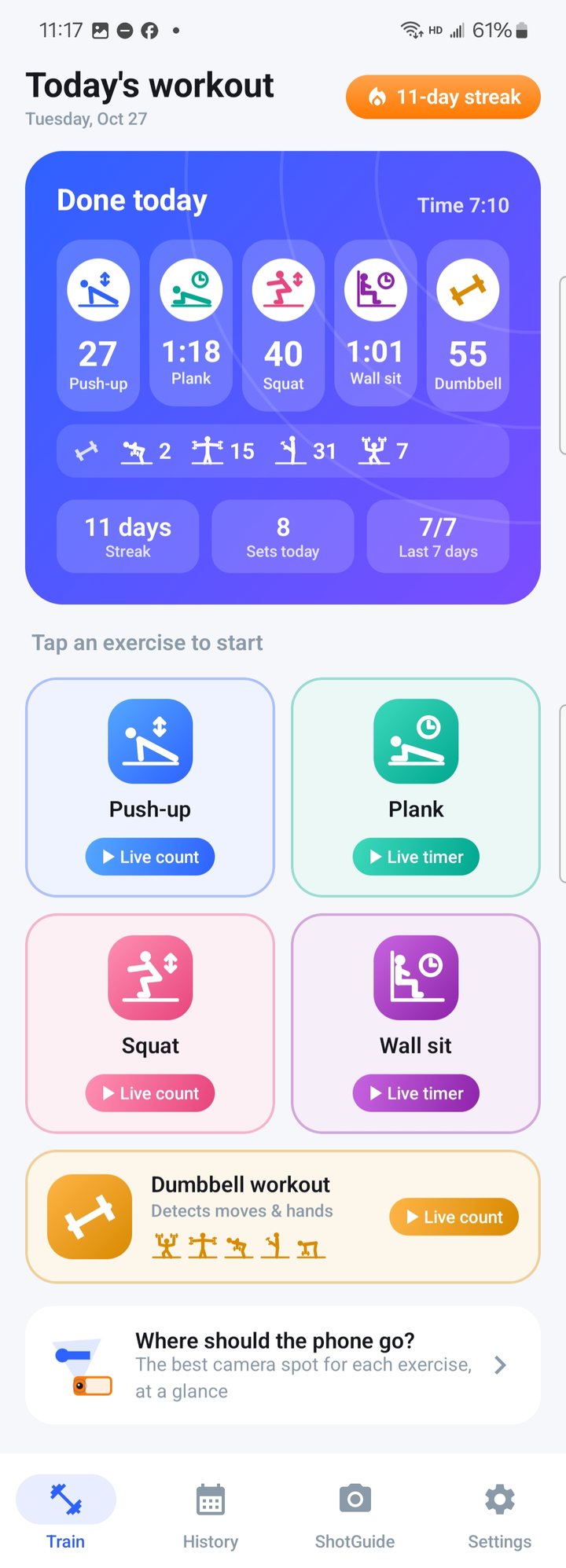

It watches, counts and calls it out
Drawn from the real live-counting screen. Film with the front or the rear camera, and switch with one tap.

Push-ups
Calls out every rep. Reps that aren’t deep enough are marked shallow, but still count.

Plank
Starts timing once your body is straight. Belly on the floor or knees down pauses it; push back up and it keeps adding.

Wall sit
Times the hold, and speaks up when your hips creep up or your back leaves the wall.
Dumbbells
Works out the move by itself (press, lateral raise, row, curl, Romanian deadlift) and counts each hand separately.
Every day, logged
Real screenshots from the latest build.
Home
Today at a glance: every exercise you did, your streak, and one tap to start the next.
History
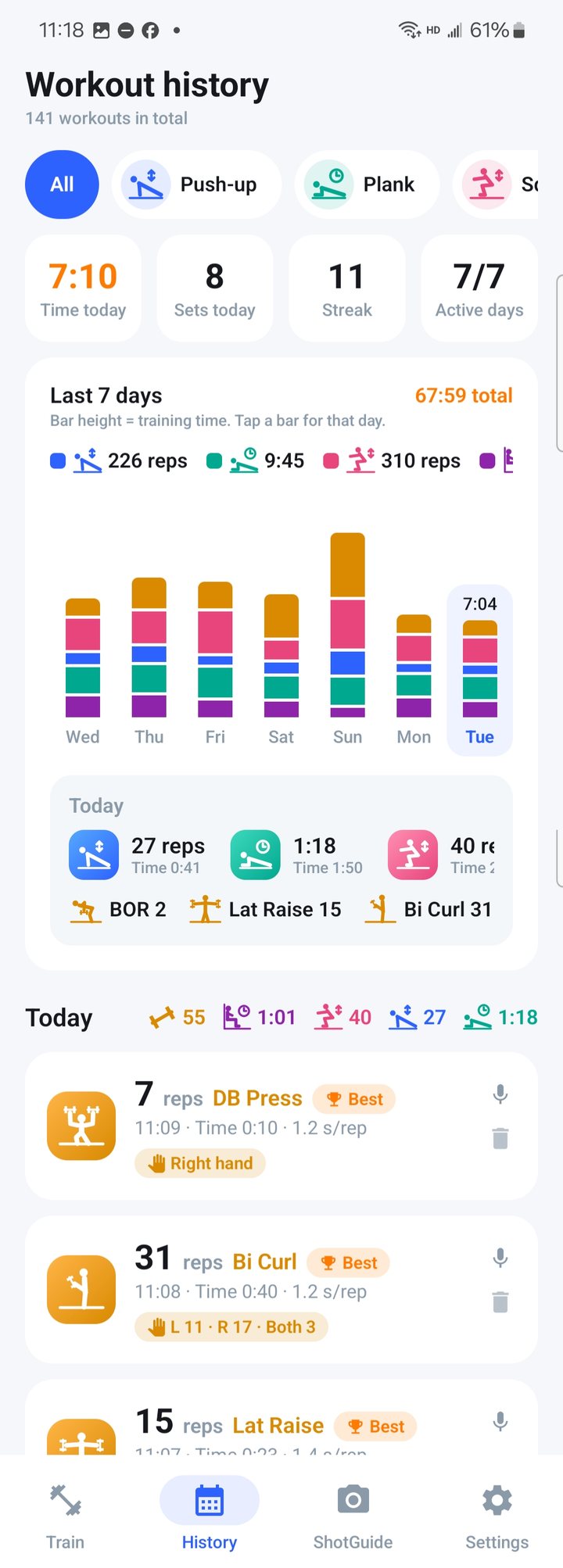
Seven days in one stacked chart, one colour per exercise. Dumbbell entries show left, right and both.
ShotGuide
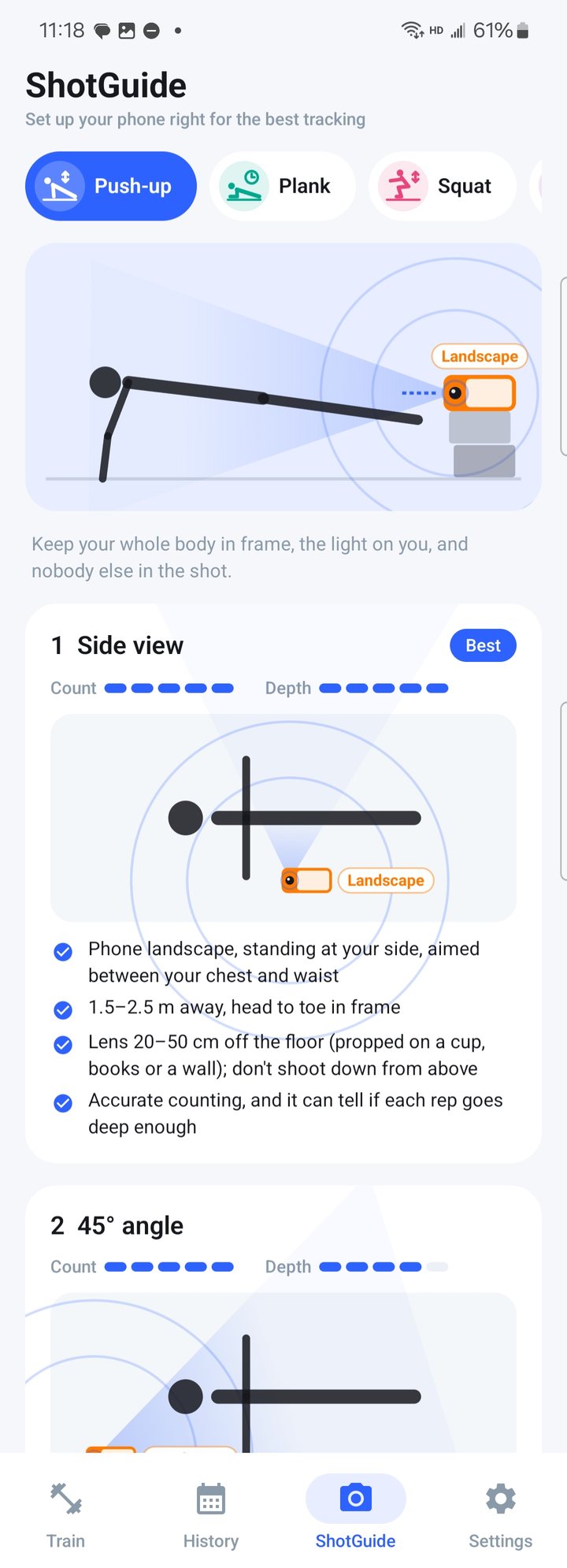
Where to put the phone for each exercise, with a diagram: side-on, 45° or straight ahead.
How it was built: the conversation
16 rounds over 11 days, translated from Chinese and cut down to the requests and the key points of each reply. Build-error fixes and small back-and-forths are left out.
A plan first, no code
I want an Android app for workout videos. I record a session (push-ups, say), and the app works out how long I trained, how hard, which moves and at what level, and keeps a check-in log. Later I'd like a basketball skill assessment too. Analyse on the phone as much as possible — I don't want to upload whole videos; bandwidth is expensive and slow. Don't write code yet. Give me a technical plan and a feasibility assessment first.
- On the phone: Google ML Kit pose detection (free, offline). Training time and rep counting are fully doable; with a fixed set of moves and a recommended camera position, counting can reach 95%+ accuracy
- Only "understanding" tasks such as the basketball assessment need the cloud: the phone picks 8–16 key frames (1–3 MB instead of a 100 MB+ video) and a vision model writes the report
- Basketball: technique is the most reliable part; level can only be a reference band; height can be estimated using the hoop (3.05 m) as a ruler; weight can't be measured, so the user types it in
- Recommendation: version 1 fully on the phone, check-ins only; basketball in version 2
Start with push-ups
Then start with push-up recognition. It should count how many I do, record it on the phone and call the numbers out loud. I'm not sure where to put the phone so you recognise it best — recommend a few camera positions.
- Live count: set the phone down, tap Start, and after a "3, 2, 1" countdown it counts, calling out each rep. A skeleton overlay shows whether you're being tracked
- A rep counts only after going down and pushing back up; standing, walking around or leaving the frame never count. Reps that aren't deep enough are marked "shallow" but still counted
- Three recommended positions: side-on (most accurate), 45° in front, and straight ahead (you can watch the screen, but depth can't be judged). The app shows a diagram for each
- History: today, last 7 days, streak, best set. Everything runs on the phone, offline
The UI is too plain
This UI won't do, it's too plain. I've attached a few examples — take a look and polish it. (Three reference images and a list of suggestions: a saturated brand colour, big bold key numbers, rounded cards, a bar chart, 2.5D camera illustrations, a celebration when you finish)
- Found the cause of the washed-out look first: the old theme took its colours from the phone's wallpaper. Switched to fixed brand colours — electric blue with energy-orange highlights
- Home: a blue-to-purple gradient card with today's results and a 🔥 streak pill; the camera guide becomes a light banner
- History: a 7-day bar chart; the best set gets orange and a 🏆
- Camera guide: all illustrations redrawn, the camera's field of view as a translucent gradient fan, star ratings replaced by energy bars
- Live screen: the number bounces on every rep and flashes a celebration every 10
Settings and a run log
Add a Settings tab. It'll need multiple languages later, plus Terms of Use and Privacy Policy entries — put them all there; Chinese only for now is fine. Also put a run log in Settings, so I can open it and see what the app has been doing. Handy for chasing bugs later.
- Settings: language (already structured for more languages), Terms of Use, Privacy Policy, version, run log
- The run log lives on the phone: one line per push-up with its time and depth verdict. If a count is ever wrong, open the log, copy it in one tap and send it over
Show the other 12 rounds
Multiple exercises + plank
Extend it to log multiple exercises and add two new ones: plank and squat. Plank first, squat next round — but change the underlying data and code so they support recording and recognising many exercises. Design an icon for each exercise, so it's clear at a glance instead of text.
- Under the hood there's now an exercise list: each one is either counted or timed, and recognition, records and stats all go by exercise. Existing push-up records are kept
- Plank: the timer starts by itself once your body is straight; kneeling to rest pauses it and pushing back up carries on adding. Time is called every 10 s; sagging or raised hips trigger a spoken warning
- Each exercise gets a side-view figure icon and its own colour: push-up blue, plank teal, squat pink
Feedback from a real phone
Push-up records are still there, and the timing is accurate. Are sagging or raised hips supposed to be spoken? I didn't hear anything. At one point my belly was on the floor and it didn't notice — kept timing. Feels like it ignores the floor and only checks whether the body is straight. Kneeling mid-way and carrying on works fine.
- You're right: it only checked whether the body was straight, not the floor. Now a floor line runs from elbows to toes; if the hips get too close to it, that's lying down — the timer pauses with "Belly on the floor, timer paused"
- Sagging and raised hips were already spoken, but the thresholds were too strict for normal amounts. Lowered — the warning now comes within a second
Add squats
Add another new exercise: squats.
- It measures how high your hips are above your ankles, scaled by your leg length, so it counts from the side, at 45° or head-on. Thighs near level count as full depth; anything less is marked "shallow"
- Squats are done standing, so the setup differs: phone upright, lens at waist height
Everything on one screen
1. Can the counter card on Home show every exercise I did today with its amount, so I don't have to switch exercises? 2. Same for the bar chart on History — put every exercise, counts and times, into one chart. 3. In the camera diagrams the phone is just a stick, it's not obvious. Draw a phone with a camera, so people see at a glance "oh, that's how the phone goes".
- Home card: one column per exercise (icon + today's amount); exercises you haven't done are dimmed, so you see what's left
- History: one bar per day, stacked by exercise in its colour. Reps and seconds aren't the same unit, so bar height is training time; tap any bar for that day's breakdown
- The phone in the diagrams is now an orange phone with a camera lens, labelled "landscape" or "portrait"
Tap an exercise to start
Remove the "Analyse a video from the gallery" entry — comment the code out, I may turn it back on later. Remove the "Live count" card too; picking an exercise should go straight to the camera. And no Chinese in the logs: all output and error messages in English. Give the log page a light background.
- The exercise cards on Home are now start buttons: tap push-up, plank or squat and the camera opens
- The run log is all English; messages shown to the user stay in Chinese. The log page is light, with warnings in orange and errors in red
A full set of dumbbell moves
Next, add a set of dumbbell exercises: bench press, seated shoulder press, lateral raise, bent-over row, biceps curl, Romanian deadlift. Can it tell automatically which move it is, and whether it's one hand or both? If it can't be that precise, group them into press, raise, curl and pull — but ideally still tell one hand from two and tag it.
- It can: all 6 moves are recognised directly, and it tells both hands, left and right apart
- It watches two things — how high the wrists rise relative to the shoulders and how far the body leans — then judges the move from the pose at the top
- A move is confirmed on its second rep before counting starts, so scratching your head or picking up a dumbbell doesn't count. 20 s of rest starts a new set; changing moves starts one automatically
- Best filmed from 45° in front with the phone upright: from the side, the far hand is hidden behind the body
One entry per move per session
Within one dumbbell session (from starting to stopping the recording), log each move once — say, curls — and underneath show how many left, right and both. Once the dumbbells are out you always do a bit of everything with each hand. The way it logs now, there are far too many entries.
- One entry per move per session, e.g. "Bi Curl 31 reps · L 11 · R 17 · Both 3"
- The little pills at the bottom of the camera screen are merged by move too; at the end it says "3 moves this session, 36 reps in total"
Wall sit
Add recognition and logging for the wall sit. Like the plank, just time it.
- Slide down the wall until your thighs are near level and hold still: the timer starts by itself. Too high gets "Go a bit lower", leaning off the wall gets "Keep your back on the wall", and standing up to rest pauses it
- The four bodyweight exercises on Home become a 2×2 grid; the new colour is grape purple, checked for colour-blind contrast against the other four
Add English
Now the languages: add English next to Chinese. Follow the phone's system language by default; if it isn't one we support, default to English. Translate the Chinese in the app yourself. And bump the version number with every update.
- Follows the system language by default; Settings offers "System / 简体中文 / English", switching without a restart
- About 440 strings translated; the spoken counts, timers and form warnings switch to English too
- The home-screen app name is 训练视界 on Chinese phones and TrainVision elsewhere
- The version number now goes up by one with every build
A round of polish
More polish: show the exercise name on the other exercises' records too; call the camera guide "ShotGuide" in English; merge seated, lying and lunge presses into one "press" — too fine-grained, easy to get wrong; curls are often taken for bent-over rows, maybe because I lean forward a bit; the camera needs zoom, especially for selfies, or I have to put the phone miles away to fit my whole body in a plank; in the wall sit my thighs are level but it still says they're not; in the plank I'm flat but it still says my hips are too high.
- The three presses merge into one "DB Press"; older records are renamed automatically
- Curls read as rows: leaning forward used to be enough for a row; now the elbows must also pull back and up
- Pinch to zoom on the camera screen, plus 0.6× / 1× / 2× shortcuts; the preview is no longer cropped, so what you see is exactly what's analysed
- Wall-sit and plank false alarms: the detected hip point sits a few centimetres above the real joint, so the thresholds were relaxed to match
English abbreviations + selfie by default
Some dumbbell names are too long in English and get cut off — use abbreviations: DB Press, RDL, BOR, Bi Curl, Lat Raise. And open the camera in selfie mode (front camera) at 0.6× by default.
- The English UI uses the abbreviations; the voice still says the full names ("BOR" read aloud is a strange word)
- Front camera by default; each camera opens at its widest setting the first time, then remembers your choice
Reading the logs
(pastes a full run log) Squats are fine — I often do single-leg half squats, so they come out shallow. The manual correction at the end can go: whatever it recognises is what gets logged. Look through the log for anything else that's off. And add a "save to file" button on the log page — pasting long logs into the chat takes up the whole screen.
- The log shows the earlier wall-sit and plank adjustments worked: no more false alarms
- The log also revealed that "Go a bit lower" in the wall sit repeated every 6 s, because your level sitting position sat right on the line that stops the warning. Fixed
- The end-of-session dialog no longer has −/+; it shows what was recognised
- The log page has a Save button: it writes a .txt file and needs no storage permission
About this case
We built TrainVision ourselves, in the same console anyone can sign up for, and tested it on our own phones. It isn’t on Google Play; the download above is the same test build we install on our phones. The screenshots are real; the four live-counting pictures are illustrations, because the originals were filmed in a cluttered room.
Your app won’t look like this one. It’ll look like whatever you describe.
What do you want to build?
Describe it in a sentence. The AI asks a few questions, then starts building.
Start Building for Free →